
Bulk download images, PDFs and files in one click
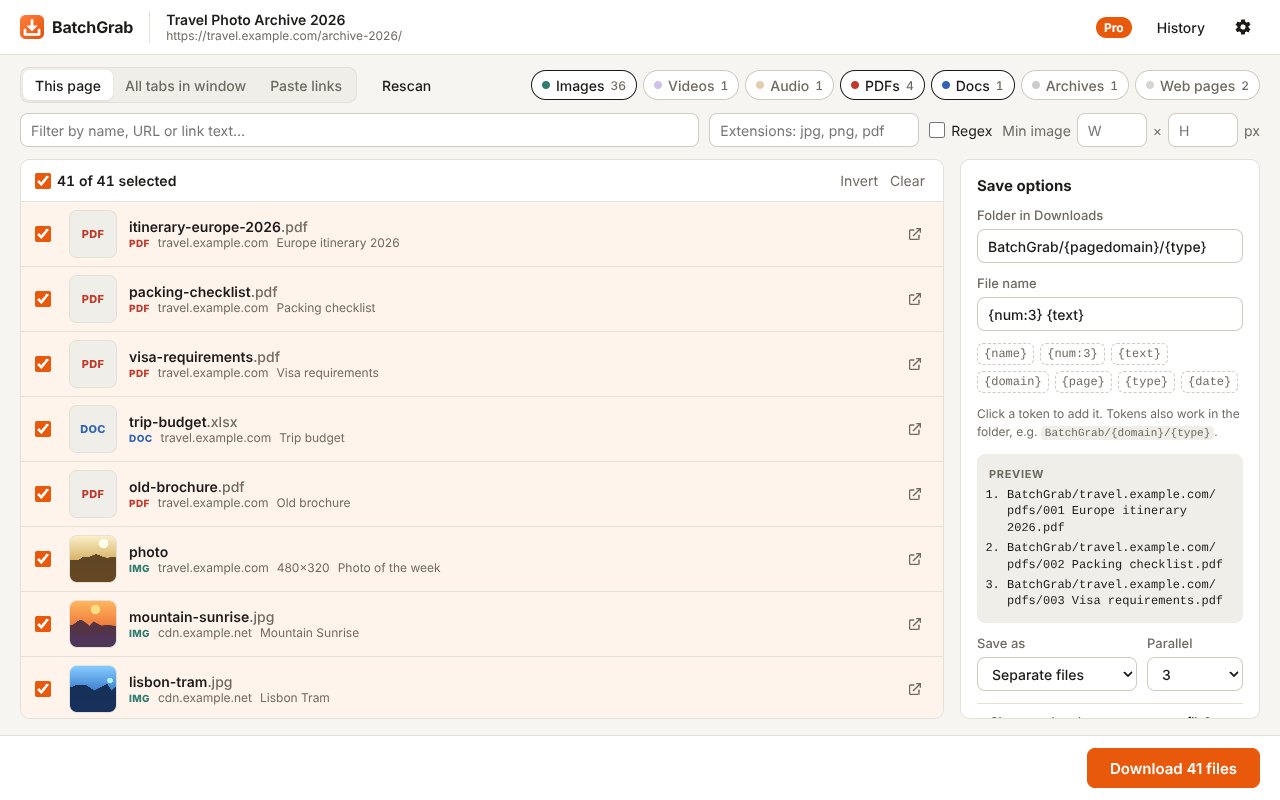
BatchGrab finds every downloadable file on the page you are viewing, lets you pick what you want, and saves it all at once, neatly named and sorted into folders.
What it does
Finds everything
Images (including lazy-loaded and full-size versions), PDFs, documents, archives, audio and video files linked on the page.
Filter fast
Pick file types with one click, search by name or link text, or filter by extension.
Download in one go
Choose what you need and press Download. Pause, resume, cancel and retry failed files.
Private by design
No account, no tracking, no ads. Everything runs in your browser.
Free and Pro
| Free | Pro | |
|---|---|---|
| Find and filter files on a page | ✓ | ✓ |
| Paste a list of links | ✓ | ✓ |
| Files per download batch | 20 | Unlimited |
| Grab from all tabs in the window | – | ✓ |
| Rename patterns (numbers, link text, domain, date) | – | ✓ |
| Auto-folders by site and file type | – | ✓ |
| Save everything as one ZIP | – | ✓ |
| Regex and minimum image size filters | – | ✓ |
| Download history | – | ✓ |
Pro is a one-time payment of US$9.99 (plus tax where it applies). No subscription. Payments are handled by Lemon Squeezy; Pro is sold by the BatchGrab developer, not by Google. See the terms of sale and refunds.
How to activate Pro
- Open BatchGrab and click Upgrade to Pro, then Get Pro.
- After paying, copy the license key from the confirmation page or from your receipt email.
- In BatchGrab, click Upgrade to Pro again, paste the key under Already bought it? and press Activate.
Moving to a new computer? Open BatchGrab settings (the gear icon), press Remove license from this browser, then activate the same key on the new one.
FAQ
Chrome asks where to save every single file
Turn off Ask where to save each file before downloading in Chrome Settings → Downloads, or use Save as one ZIP (Pro) to get a single prompt.
Some images are missing
Many sites load images only when you scroll. Scroll to the bottom of the page, then press Rescan.
Does it download from YouTube?
No. Downloading from YouTube is not allowed by the Chrome Web Store policies. Please only download files you have the right to save.
Can I get a refund?
Yes, within 14 days of purchase. Email muhakbaryusuf.ppp@gmail.com with your order number.